


We are proud to be Dogtra’s sole authorised dealer in NZ.
FeaturesNo cellular data required! - GPS only!
* Geo Fence/GPS Dog Fence feature
* NOT compatible with Dogtra Pathfinder 1 units
* AU legal frequency
* Suits small dogs from 7kg
* GPS Connector with E-Collar Function Button
* 2-Second Update Rate
* Offline Maps (Google Map)
* Precise and Up-to-date Maps
* 100 levels of stimulation with Rheostat/Slider Dial
* Nick and Constant Stimulation
* Receiver Lock Mode and Sleep Mode
* Waterproof and rechargeable system (IPX 7)
* 3.5 hours fast charge batteries
* 2 Year NZ Local Warranty by DogMaster
* SMARTPHONE IS NOT INCLUDED
Download Pathfinder 2 GPS Dog Tracker Manual From here.
Dogtra Pathfinder 2 Mini GPS Dog Track, Train System
- Brand
- Dogtra
- SKU:
- 93-DAP-021
- UPC:
- 602919252275



Dogtra Smart NOBark Collar
Dogtra GPS Dog Fence System - min. 3000sqm

Dogtra Wireless Smart Dog Fence System

Dogtra Pathfinder 2 Add on GPS Track, Train & Fence Dog Collar - Black

Dogtra Pathfinder 2 Add on GPS Track, Train Dog Collar - Green

Dogtra Pathfinder 2 Mini Add on GPS Track, Train Dog Collar - Green
Dogtra Pathfinder 2 Mini Add on GPS Track, Train Dog Collar - Black
The Pathfinder 2 Mini works without using cellular data. Simply download the free Dogtra Pathfinder 2 app to your smartphone and add free offline maps. Once the maps are downloaded (while connected to Wi-Fi), you can track and train your dog using offline map mode without needing mobile phone data.
The new Dogtra Pathfinder 2 Mini GPS Dog Tracking & Training System combines GPS tracking and e-collar training into one system that operates directly from your smartphone (iOS or Android). It provides an easier and more convenient way to track and train your dog's using a high-resolution mobile screen.
Unlike many other GPS e-collars, the Pathfinder 2 Mini allows you to view tracking information on a larger, clearer smartphone display for improved detail and usability.
How does it work?
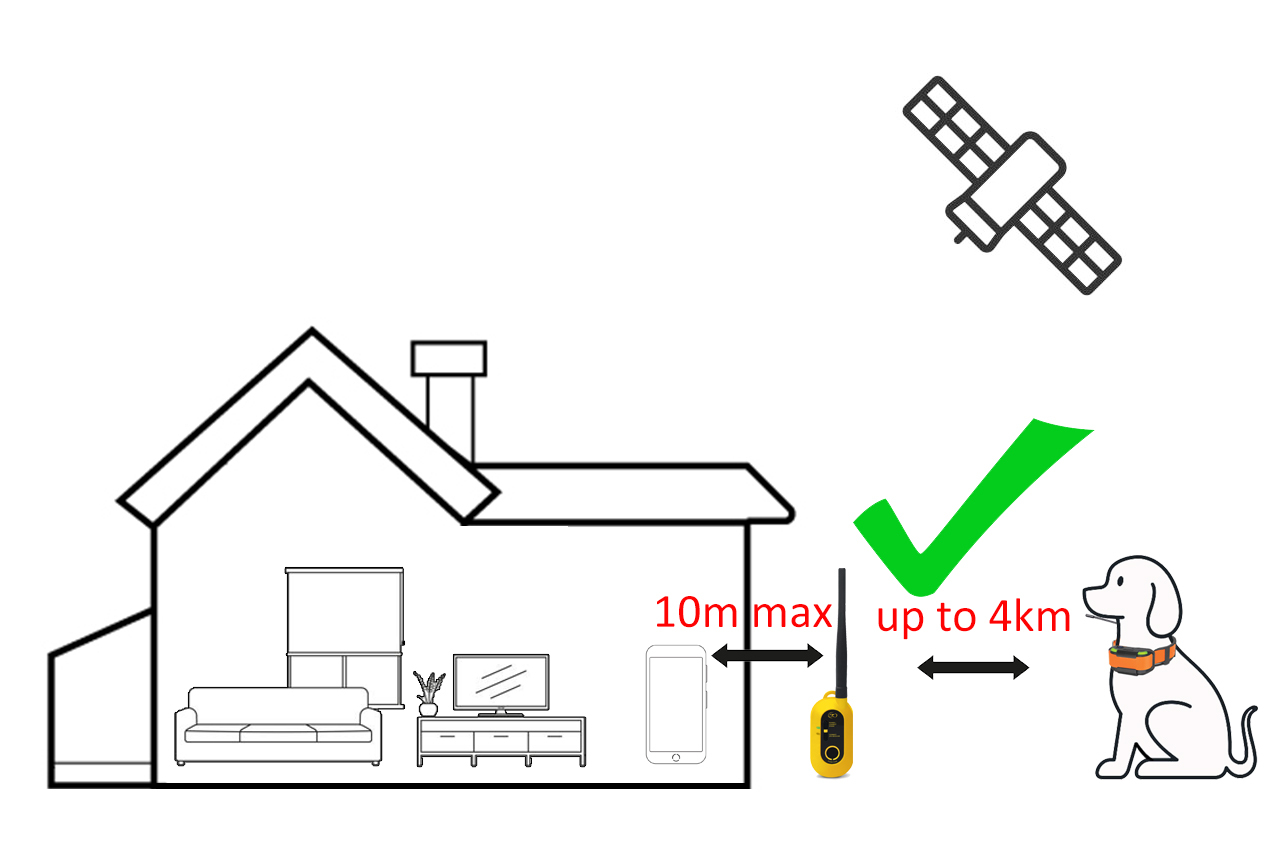
The Dogtra Pathfinder 2 Mini uses your smartphone as the handheld tracking device. The Pathfinder 2 Connector acts as an intermediate device that links your smartphone to the dog tracking collar. It connects to your smartphone via Bluetooth and communicates with the dog collar via radio signal.
You will use the offline version of Google Maps™ on your smartphone, with access to standard, satellite, and terrain views. The Dogtra Pathfinder app allows you to track up to 21 dogs or hunters, share locations with other users, replay tracking history, and create custom Geo-Fence notifications.
With a fast two-second update rate and powerful zoom capability, the Pathfinder provides highly detailed, real-time tracking and accurate location information when you are out hunting or working your dogs.
New Geo Fence Feature (outdoor only)
The Pathfinder 2 Mini features three fence modes, allowing you to receive notifications if your dog approaches or escapes a boundary, or to automatically correct your dog directly from the Pathfinder 2 collar.
Mobile Fence Mode
Mobile Fence Mode creates a fence that moves with your smartphone’s location. The boundary is set as a radius centred around the phone/GPS connector. The radius can be adjusted from 9 metres up to 1,800 metres. You will receive a notification if your dog approaches the boundary. Notifications can be set as sound, vibration, or a pop-up message on your phone.
Geo Fence Mode
Geo Fence Mode allows you to set up a custom closed boundary on the map. You will receive a notification when your dog enters or exits the Geo Fence boundary. This mode provides alerts only and does not apply automatic stimulation.
Electric Fence Mode (outdoor only)
Electric Fence Mode allows you to set up a custom closed Geo Fence boundary and apply a preset stimulation level on the collar when your dog approaches or crosses the boundary. Once the stimulation settings and boundary information are synced to the GPS collar, the collar stores the location data and will operate independently. This means the phone or GPS connector does not need to be nearby for the fence to work.
When your dog approaches the boundary, the collar will first deliver a vibration warning at approximately 4 metres from the boundary. If your dog continues closer, a preset level of static stimulation will be applied.
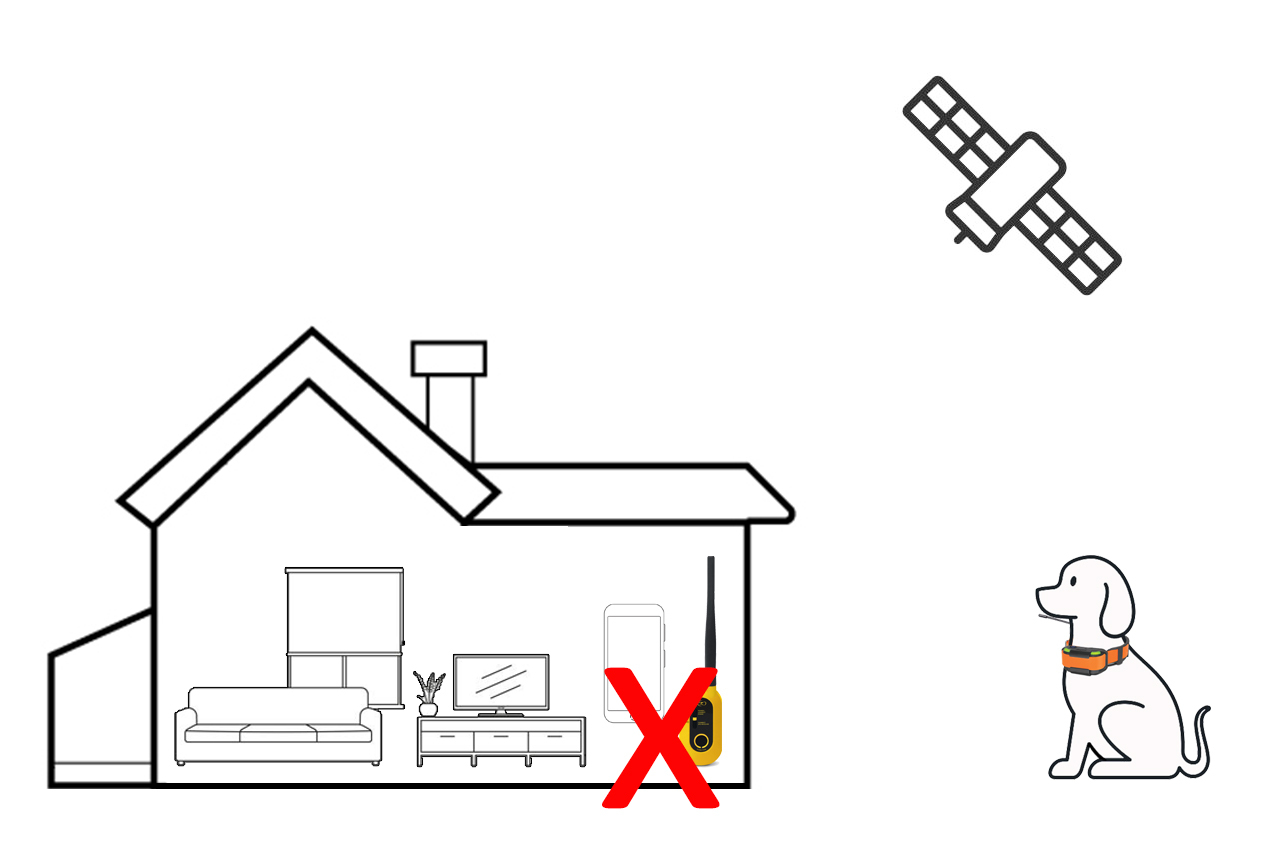
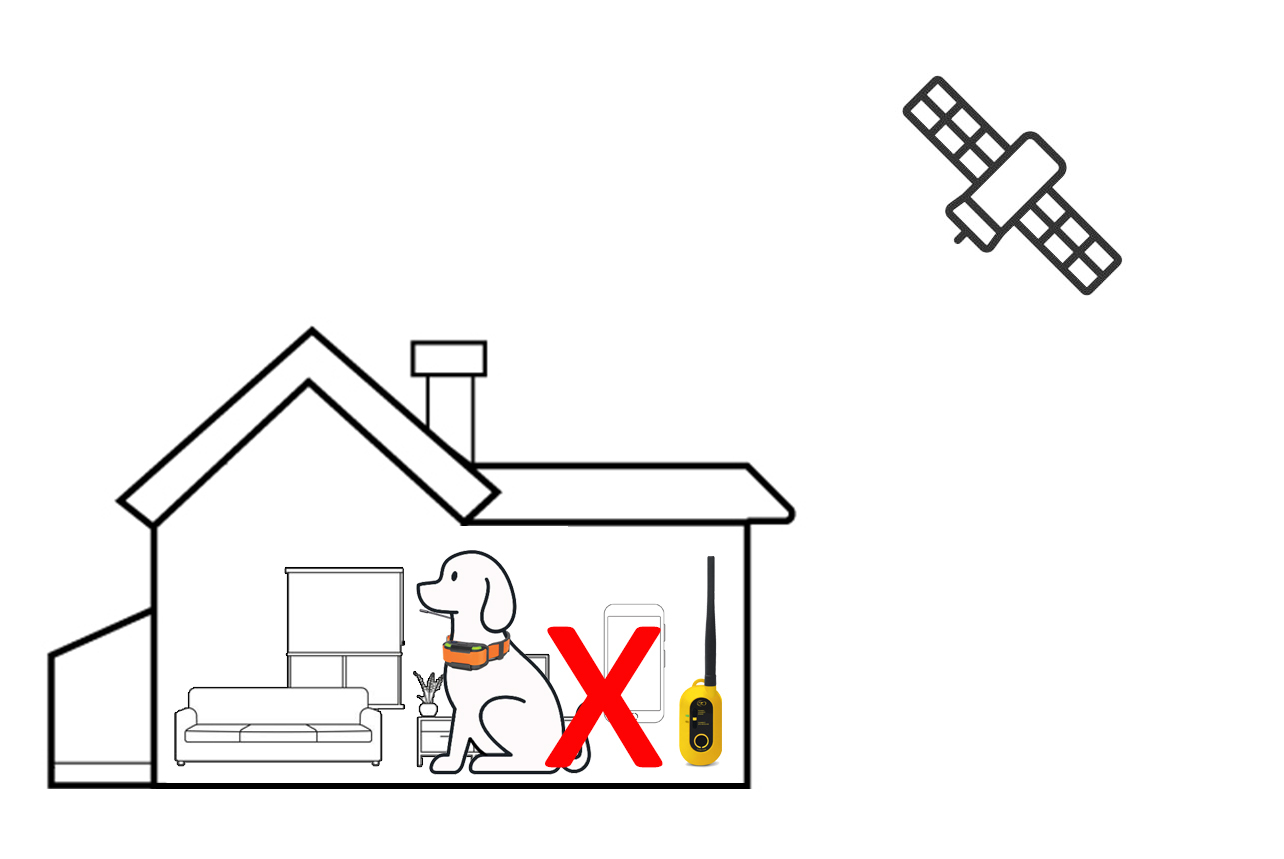
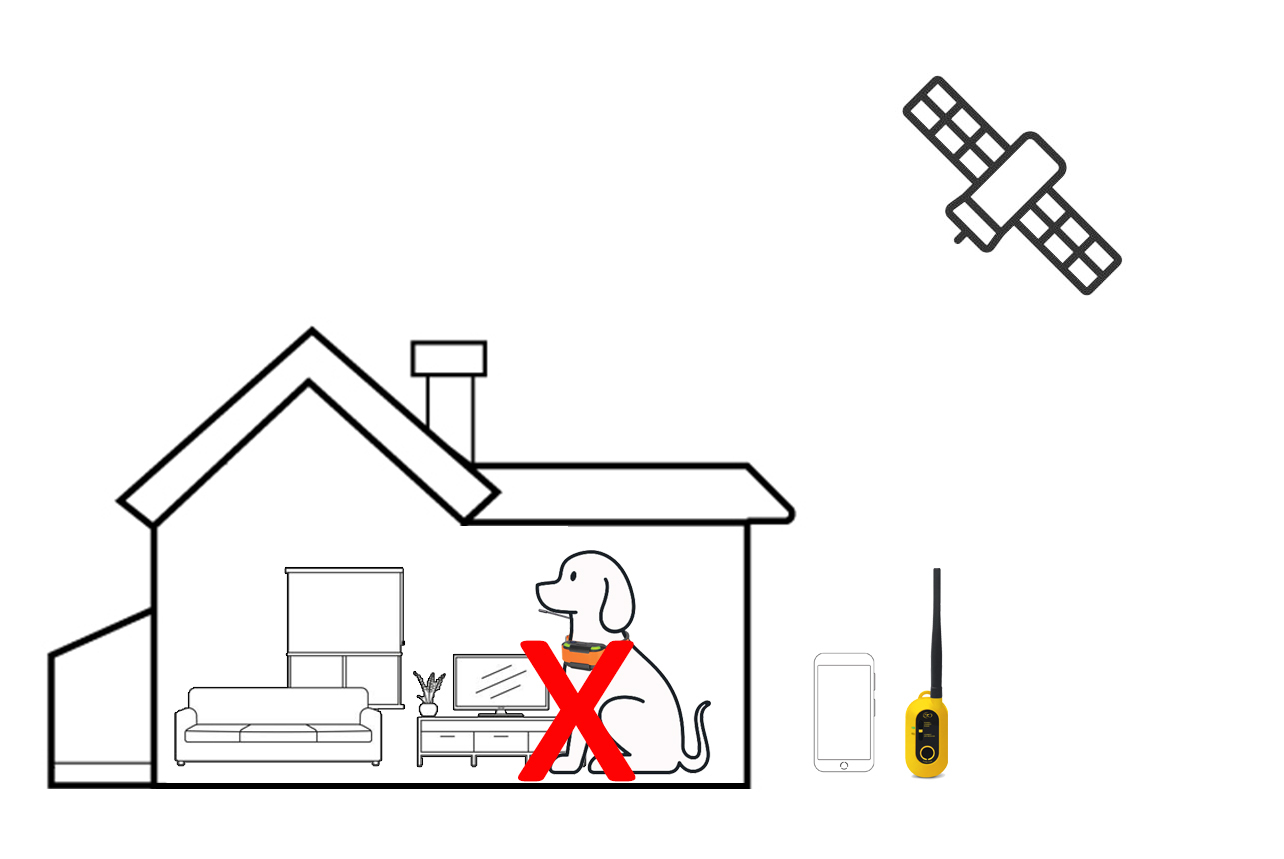
This mode is designed for outdoor use only. The collar requires GPS satellite signal to function correctly. If the dog frequently enters the house or goes under cover, the collar may lose GPS signal, which can cause false alerts or unintended corrections. To reduce this, you can lower the GPS update rate (for example, to 30 seconds or 1 minute) so the collar checks location less frequently. If the dog remains indoors for extended periods, the collar should be removed or fence mode turned off.
Geo Fence Boundary settings
There is a minimum requirement of 800 square metres for a Geo Fence boundary. You can create up to 15 drop points on Google Maps, and the boundary must form a closed loop. You can also create up to 3 inner boundaries (smaller Geo Fences inside the outer boundary). All boundaries must be at least 4.5 metres apart.
Maps Available for download and use
Google Map – Normal
Google Map – Satellite
Google Map – Terrain
Offline Maps – Outdoors
Offline Maps – Google Normal
Offline Maps – Google Satellite
Offline Maps – Google Terrain
Offline Maps – Custom Maps
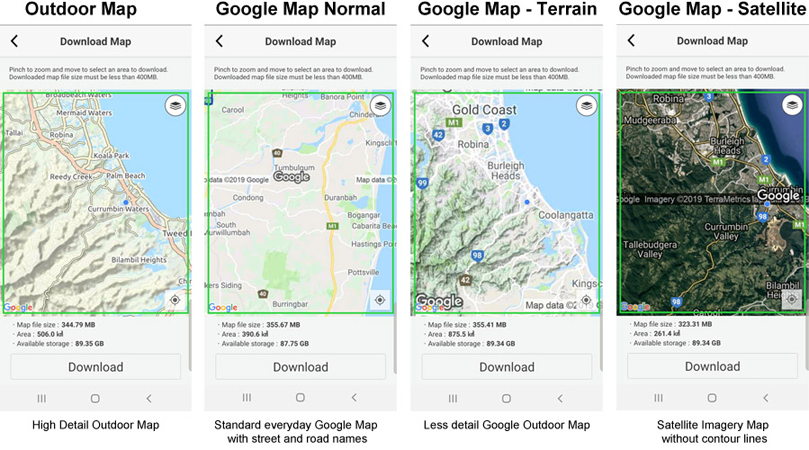
For live tracking without downloading offline maps, you can use Google Maps in Normal (street view), Satellite (true view), and Terrain (with contour lines and basic topographic detail). These modes require an internet connection for full functionality.
If you require more detailed mapping with enhanced contour lines and topographic information, you will need to download Offline Maps – Outdoors. This map option provides terrain contours and summit points at 10-metre intervals, along with 3D shading for improved visibility. The level of detail is comparable to a Garmin Topo full map.
The Dogtra Pathfinder app allows you to download up to 400MB of map data per download onto your smartphone. If you plan to hunt or work dogs in multiple areas, you can download different map sections while connected to the internet before heading out. There is no limit to how many map areas you can download; however, each individual download is limited to 400MB. You can also merge multiple downloaded map sections to cover a larger area if required.
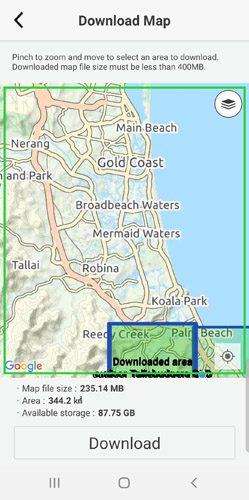
The downloaded map area will be highlighted in blue, and the area currently selected for download will appear in green. You can select overlapping sections of an existing downloaded area to extend your map coverage.
All maps are stored within the Dogtra Pathfinder app on your smartphone’s internal memory. If your smartphone has larger internal storage capacity, you will be able to download and store more map data.
For Android users, the app can be moved to an SD card (if supported by your device), or the SD card can be configured as internal storage on compatible Android systems (such as Android Marshmallow) to provide additional space for map data.
Package includes
Dogtra Pathfinder 2 Mini GPS / E-Collar
Dogtra GPS “Connector”
Belt clip and lanyard
Charger and splitter charging cable
E-collar stimulation test light
Dogtra Pathfinder 2 “Connector”
On/off button
Connects to smartphone via Bluetooth (maximum range 10 metres)
Fully waterproof (IPX 7)
Battery power indicator
Fast-charge lithium polymer battery
Dogtra Pathfinder 2 “Mini Dog Collar”
Suitable for dogs from 7kg
On/off button
Fully waterproof (IPX 7)
Battery power indicator
Fast-charge lithium polymer battery
Standard contact probes for most dogs
Extended contact probes included for long-haired dogs
Dogtra Pathfinder App
(Available in Apple iTunes & Google Play store)
Controls tracking and e-collar stimulation functions directly from your smartphone
Compatible with iOS 8.1 and above & Android 4.3 and above
Expandable to track and train up to 21 dogs
Google Maps satellite and terrain views (offline maps available for download)
Fast 2-second GPS update rate
Displays your dog’s position, your shared friends’ positions, and your own location
Dog status indicators: on-point, treed, or running
Custom alerts for dog actions (sound or vibration)
Geo-Fence with alerts for customised boundaries
Manual start/stop tracking with history recording
History playback available on smartphone and computer
Easy location sharing for dogs and other users
100 levels of Momentary (Nick) and Constant stimulation
Non-stimulating tone option
Digital compass
GPS Dog Tracking — Side-by-Side Comparison
All three systems work without mobile data or monthly subscription fees · NZ stock
| Pathfinder 2 Mini | Pathfinder 2 | Garmin Alpha 200/T20 | Garmin Alpha 300/T20 | Garmin Alpha 300/Tt25 | Garmin Alpha 300i/T20 | Garmin Alpha 300i/Tt25 | |
|---|---|---|---|---|---|---|---|
| Brand | Dogtra | Dogtra | Garmin | Garmin | Garmin | Garmin | Garmin |
| Min. dog size | 7kg+ | 15kg+ | 9kg+ | 9kg+ | 9kg+ | 9kg+ | 9kg+ |
| Display device | Your smartphone | Your smartphone | Dedicated handheld | Dedicated handheld | Dedicated handheld | Dedicated handheld | Dedicated handheld |
| Tracking range | Up to 3km | Up to 3km | Varies by terrain | Varies by terrain | Varies by terrain | Varies by terrain | Varies by terrain |
| Satellite communication - inreach | N/A | N/A | N/A | N/A | N/A | Yes- send texts, share location and SOS | Yes- send texts, share location and SOS |
| Max dogs tracked | 21 | 21 | 20 | 20 | 20 | 20 | 20 |
| Training function | Yes — 100 levels | Yes — 100 levels | Tracking only (T20) | Tracking only (T20) | Yes — 18 levels | Tracking only (T20) | Yes — 18 levels |
| GPS fence | Yes — 3 modes | Yes — 3 modes | No | No | No | No | No |
| Preloaded maps | Download via app - topo, satellite and google map | Download via app - topo, satellite and google map | Yes — AU TOPO Active | Yes — AU TOPO Active, birdseye | Yes — AU TOPO Active, birdseye | Yes — AU TOPO Active, birdseye | Yes — AU TOPO Active, birdseye |
| Handheld battery | Your phone battery | Your phone battery | Up to 20 hours | Up to 20 hours | Up to 20 hours | Up to 20 hours | Up to 20 hours |
| Collar battery | ~3.5hr charge | ~3.5hr charge | Up to 168 hours | Up to 168 hours | Up to 168 hours | Up to 168 hours | Up to 168 hours |
| Mobile data needed | No | No | No | No | No | No | No |
| Subscription | None | None | None | None | None | Inreach only | Inreach only |
| Warranty | 2-year NZ local | 2-year NZ local | 1-year | 1-year | 1-year | 1-year | 1-year |
| Best for | Small breeds, hunting & containment | Large dogs, hunting & containment | Serious hunters & professional handlers | Serious hunters & professional handlers | Serious hunters & professional handlers | Serious hunters & professional handlers | Serious hunters & professional handlers |
Videos Hide Videos Show Videos
-

Basic Setup | Dogtra PATHFINDER2 GPS Dog Tracking and Training System
In this tutorial PATHFINDER2 users will learn how to get start...
-
Dogtra PATHFINDER2 Firmware Update - MUST!
Here's a quick video on how to update to the new firmware for ...
-
E-Collar Function Button | Dogtra PATHFINDER2 GPS Dog Tracking and Training System
In this video you will learn how to set up the E-Collar Functi...

Dogtra Smart NOBark Collar
Dogtra GPS Dog Fence System - min. 3000sqm
Dogtra Wireless Smart Dog Fence System
Dogtra Pathfinder 2 Add on GPS Track, Train & Fence Dog Collar - Black
Dogtra Pathfinder 2 Add on GPS Track, Train Dog Collar - Green
Dogtra Pathfinder 2 Mini Add on GPS Track, Train Dog Collar - Green